
There is no single right way to choose a baby name.
Some parents want to move slowly and learn about each name. Others want to compare quickly and narrow options fast. Most people use a mix of both.
With Namesies, you can rate names in the way that suits you best.
One at a Time
Use One at a Time when you want a slower, focused rating flow.
 One at a time rating page
The concept is simple: if you like the name, give it a thumbs up and click "Like". If you are on the fence or don't like it all, just click "Maybe" or "Dislike". Relax, have some fun, and let your preferences emerge naturally. The threshold for what separates a "like" vs a "maybe" vs a "dislike" is entirely up to you.
In addition to the name and gender, you can also see if the name ranked in the top 1000 in the US. If you want to learn a bit more about a name, click on the blue info button in the top right corner of the card.
Head-to-Head
Use Head-to-Head when you are ready to distinguish your favorites.
 Head-to-Head rating page
It's easy to like 50 names but which ones are the best of the best? With Head-to-Head, you pick the one you like best amongst your favorites. The name you like stays while the losing name is swapped with your next favorite. If you get tired of "liking" the same name over and over or don't want to make a decision, you can skip either name.
Rapid Fire
Use Rapid Fire when you want to make progress quickly.
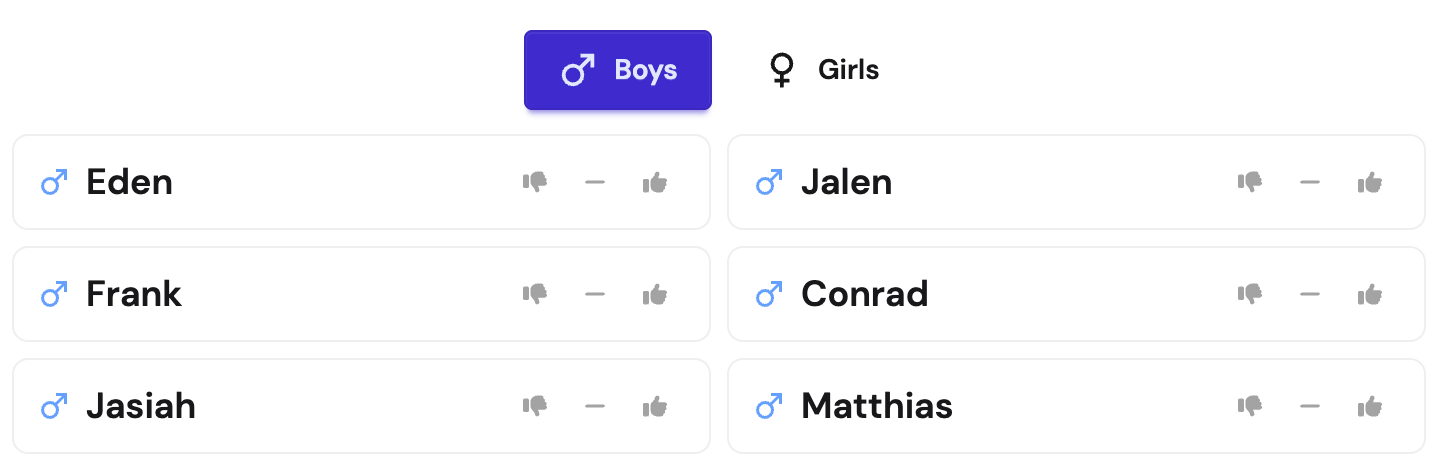 Rapid Fire rating page
Rapid Fire is a fast-paced way to rate names. Just like the One at a Time flow, you can rate a name as a "like", "maybe", or "dislike". After rating a name, you can quickly move to the next name and keep going. Your picks are saved as you go and the rated names are replaced with new names so you can keep the momentum going.
You can switch genders on each page
On any of the rating pages, you can switch the gender of the names you are rating. At the top of each of the pages, just click the gender you want to rate (♂ for male or ♀ for female).
Which one should I use?
Use whatever keeps you moving.
Many parents switch between methods depending on time, mood, and where they are in the decision process.